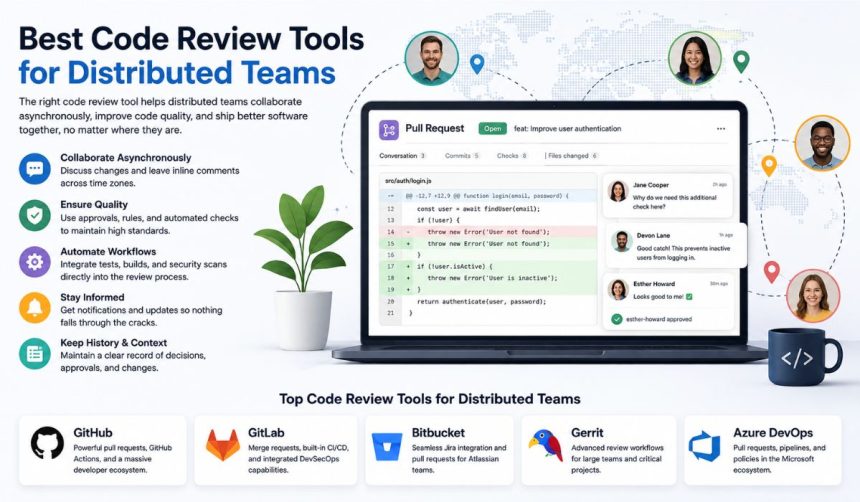
The best code review tools for distributed teams are GitHub, GitLab, Bitbucket, Gerrit, and Azure DevOps, with the right choice depending on repository hosting, CI/CD, security, and team workflow. GitHub is the strongest general-purpose option for teams already using pull requests, while GitLab suits teams wanting an integrated DevSecOps platform. Bitbucket works particularly well in Atlassian environments, Gerrit fits teams needing highly controlled reviews, and Azure DevOps is a natural choice for Microsoft-centered development organizations.
What makes a code review tool effective for distributed teams?
A good distributed-team code review tool makes asynchronous collaboration clear, traceable, and easy to manage across time zones. Reviewers should be able to understand what changed, leave contextual comments, request modifications, and approve code without requiring everyone to be online simultaneously.
The most useful capabilities include:
- Pull or merge requests: Provide a shared workspace for discussing proposed code changes.
- Inline comments: Let reviewers comment directly on specific lines.
- Approval rules: Ensure important changes receive review before merging.
- CI/CD integration: Automatically run tests, builds, linting, and security checks.
- Notifications: Help reviewers track requests without relying on meetings or chat.
- Audit history: Preserve decisions, approvals, and changes for future reference.
- Integrations: Connect reviews with issue trackers, project management, and communication tools.
For remote teams, these features matter because the review process needs to work even when developers have different working hours.
Best code review tools for distributed teams
The leading options differ mainly in how they combine code review with repository hosting, automation, security, and broader development workflows.
1. GitHub
GitHub is often the best all-around choice for distributed software teams because pull requests, reviews, discussions, CI automation, and repository management are closely connected.
GitHub pull requests allow developers to propose changes while reviewers comment on individual lines or broader changes. Teams can configure required reviewers, status checks, and branch protection rules so that code meets defined requirements before it is merged.
GitHub is particularly useful for teams that already use GitHub Actions for automation. A pull request can automatically trigger tests and other checks, giving reviewers technical evidence alongside their manual review.
Best for: General software teams, open-source projects, startups, and organizations already using GitHub.
2. GitLab
GitLab combines source-code management, merge requests, CI/CD, security tooling, and project management in one platform.
Its merge requests provide a structured place for code discussion and review. Distributed teams can use approval rules and automated pipelines to establish consistent requirements before changes enter protected branches.
GitLab can be especially attractive when a company wants fewer separate development tools. Instead of treating code review as an isolated activity, it connects review with testing, deployment, security scanning, and project tracking.
Best for: Organizations seeking an integrated DevSecOps workflow.
3. Bitbucket
Atlassian’s Bitbucket provides pull requests and code review alongside Git repositories and integrations with other Atlassian products.
Teams using Jira can connect development work with issues and pull requests, giving reviewers more context about why a change was made. This can be useful for distributed teams where reviewers may not have participated in the original planning discussion.
Bitbucket is therefore a practical option for organizations already invested in the Atlassian ecosystem.
Best for: Jira-centered engineering organizations and teams that want close issue-to-code traceability.
4. Gerrit
Gerrit takes a more review-centric approach than many repository platforms. Its workflow is built around reviewing proposed changes before they are incorporated into the main codebase.
Gerrit supports detailed review discussions, automated verification, reviewer assignment, and approval requirements. Its model can work particularly well for large engineering organizations that need strict control over how changes enter important repositories.
The trade-off is that Gerrit generally requires more specialized workflow knowledge than GitHub or Bitbucket.
Best for: Large engineering teams, infrastructure projects, and organizations requiring highly controlled code review.
5. Azure DevOps
Microsoft Azure DevOps provides pull requests through Azure Repos along with pipelines, work items, testing, and other development services.
Its pull-request workflow supports inline discussions, reviewer assignment, policies, and automated checks. Teams can use branch policies to establish requirements such as successful builds or minimum reviewer approvals before merging.
Azure DevOps is particularly suitable when development teams already rely heavily on Microsoft’s development and cloud ecosystem.
Best for: Microsoft-oriented organizations and enterprise development teams.
How should distributed teams compare code review tools?
The right comparison should focus on the team’s existing development environment rather than simply counting features. A tool that integrates naturally with a team’s repositories, CI system, issue tracker, and identity provider can reduce administrative work and make reviews easier to follow.
| Tool | Strongest use case | Review workflow | Automation | Best ecosystem fit |
|---|---|---|---|---|
| GitHub | General development | Pull requests | Strong | GitHub ecosystem |
| GitLab | DevSecOps | Merge requests | Strong | GitLab ecosystem |
| Bitbucket | Atlassian teams | Pull requests | Strong | Jira/Atlassian |
| Gerrit | Controlled reviews | Change-based review | Strong | Large engineering environments |
| Azure DevOps | Enterprise Microsoft teams | Pull requests | Strong | Microsoft ecosystem |
The table should be treated as a starting point rather than a universal ranking. For example, a Jira-heavy company may reasonably prefer Bitbucket even if GitHub offers a broader general-purpose experience.
Which features matter most for remote code reviews?
For distributed teams, asynchronous review features are usually more valuable than features designed around real-time collaboration. The goal is to let developers make progress without waiting for another team member to become available.
Asynchronous commenting
Reviewers should be able to leave comments attached to exact lines or changes. This gives developers enough context to understand what needs to change without scheduling a separate meeting.
Automated checks
Automated tests, linting, dependency checks, and security scanning reduce the amount of repetitive work reviewers need to perform manually. Human reviewers can then spend more time evaluating architecture, maintainability, and business logic.
Reviewer assignment
Automatic reviewer assignment helps prevent reviews from becoming dependent on one person. Some teams assign reviews based on code ownership so that changes are routed to developers familiar with the relevant part of the codebase.
Branch protection and approval policies
Rules can prevent unreviewed or failing changes from reaching important branches. This creates a consistent baseline even when team members work different schedules.
Searchable review history
A distributed team benefits from having review decisions documented in the repository. Future developers can see why a change was requested, approved, or modified rather than reconstructing the discussion from private messages.
How can teams improve the code review process?
The tool itself is only part of an effective distributed review workflow. Clear team conventions often have a greater impact than switching platforms.
- Keep changes reasonably focused. Smaller pull requests are generally easier to understand and review than large collections of unrelated changes.
- Define review ownership. Establish who should review particular areas of the codebase.
- Automate routine checks. Run tests, formatting, linting, and security checks before asking humans to review.
- Set review expectations. Define reasonable response times while recognizing that distributed teams may work across different time zones.
- Explain the purpose of complex changes. A short description of the problem and intended solution gives reviewers useful context.
- Keep decisions in the review. Important technical decisions should remain attached to the change rather than being lost in private chat.
- Review the process periodically. Teams should examine recurring review delays, repeated comments, and common defects to identify workflow improvements.
Are code review tools enough for distributed development?
No. A code review platform can provide the workflow, but it cannot replace engineering practices such as clear ownership, useful documentation, automated testing, and well-defined coding standards.
A common misconception is that more reviewers automatically produce better software. Excessive approvals can instead slow development without adding meaningful technical feedback. Distributed teams generally benefit more from the right reviewers, clear review criteria, small changes, and strong automated checks than from requiring every change to pass through a large group.
Another important distinction is between code review and static analysis. Code review involves people evaluating a proposed change, while static analysis uses automated rules or algorithms to identify potential problems. The two complement each other rather than serving as interchangeable alternatives.
Which code review tool should a distributed team choose?
The best choice depends primarily on the team’s existing repository and development ecosystem. GitHub is a strong default for teams wanting a broadly adopted pull-request workflow, GitLab is compelling for integrated DevSecOps, Bitbucket makes sense for Jira-centered organizations, Gerrit suits strict review environments, and Azure DevOps fits Microsoft-focused enterprises.
Teams should also evaluate pricing, self-hosting requirements, security controls, integrations, repository migration costs, and how easily reviewers can work asynchronously. The best platform is ultimately the one that makes the team’s existing development process more consistent rather than adding another disconnected system.
Conclusion
The best code review tools for distributed teams are not determined by a single feature or universal ranking. GitHub, GitLab, Bitbucket, Gerrit, and Azure DevOps each provide strong review workflows, but their advantages depend on the team’s repository platform, automation requirements, security model, and existing integrations. Teams comparing these options should also examine pull request best practices, automated code review, CI/CD, and developer collaboration workflows to build a review process that works across time zones.