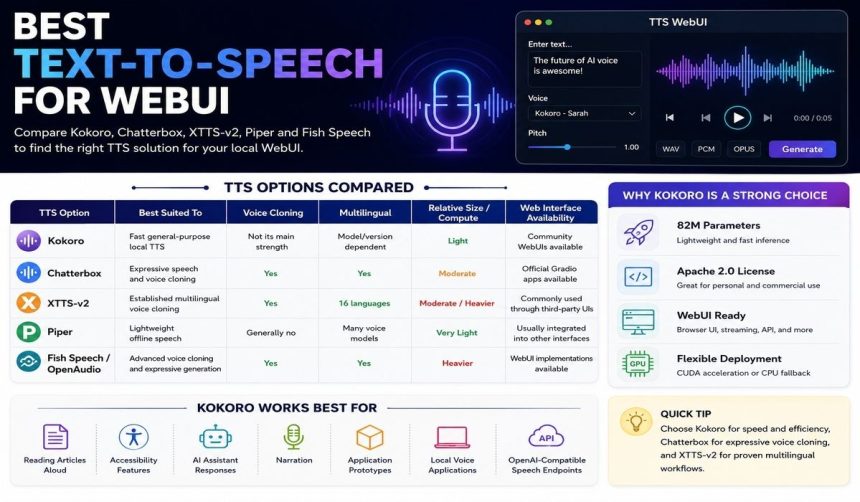
If you’re looking for the best text-to-speech for WebUI, Kokoro is one of the strongest starting points for fast, efficient local speech generation, while Chatterbox makes more sense when you need voice cloning or expressive speech. Kokoro is lightweight and practical for browser-based interfaces; Chatterbox gives you richer voice controls and multilingual cloning. XTTS-v2 is still useful for established multilingual workflows, and Piper fits lightweight offline applications where efficiency matters more than expressive delivery.
What Is the Best Text-to-Speech for WebUI?
For most people setting up a local WebUI, Kokoro offers an especially useful balance of speech quality, speed, deployment flexibility, and relatively modest hardware requirements.
Kokoro is an open-weight text-to-speech model with about 82 million parameters, so it’s substantially smaller than many neural TTS systems. That compact architecture is particularly useful in local browser interfaces where you want to type text, choose a voice, and generate audio without running an unnecessarily large inference server. Kokoro’s model weights have also been released under the Apache 2.0 license, making the model suitable for many personal and commercial deployment scenarios. (github.com)
A dedicated Kokoro WebUI implementation shows why the model works well in this role. It provides a browser interface, multiple voices, WAV, PCM and Opus output, pitch adjustment, streaming generation, CUDA acceleration, CPU fallback, and an OpenAI-compatible /v1/audio/speech API. (github.com)
That doesn’t make Kokoro the automatic winner for every project. If you’re mainly trying to clone a particular voice, produce emotionally expressive dialogue, or generate speech across multiple languages, Chatterbox or another cloning-focused model may fit your needs better.
The Best WebUI TTS Options Compared
Kokoro, Chatterbox, XTTS-v2, Piper, and Fish Speech solve different TTS problems, so it’s more useful to compare their strengths than treat them as interchangeable tools.
| TTS option | Best suited to | Voice cloning | Multilingual | Relative model size/compute | Web interface availability |
| Kokoro | Fast general-purpose local TTS | Not its main strength | Model/version dependent | Light | Community WebUIs available |
| Chatterbox | Expressive speech and voice cloning | Yes | Yes | Moderate | Official Gradio apps available |
| XTTS-v2 | Established multilingual voice cloning | Yes | 16 languages | Moderate/heavier | Commonly used through third-party UIs |
| Piper | Lightweight offline speech | Generally no | Many voice models | Very light | Usually integrated into other interfaces |
| Fish Speech/OpenAudio | Advanced voice cloning and expressive generation | Yes | Yes | Heavier | WebUI implementations available |
The distinction matters because “best” can mean very different things. A WebUI running on a modest home computer has different requirements from a GPU workstation generating cloned character voices for games, videos, or conversational applications.
Why Kokoro Is a Strong Choice for a TTS WebUI
Kokoro stands out because its 82-million-parameter architecture can provide capable neural speech synthesis without the resource demands associated with much larger generative speech models.
That relatively small footprint matters in a WebUI. The browser interface itself isn’t usually the computational bottleneck; the underlying speech model determines whether generation feels responsive or cumbersome. Smaller models can generally load faster and consume less memory, though your actual performance will still depend on the implementation, hardware, text length, audio settings, and inference backend.
Kokoro’s Apache-licensed weights also give you considerable deployment flexibility. Community projects have packaged the model behind FastAPI, ONNX, and browser interfaces, including setups that support CPU execution as well as NVIDIA GPU acceleration. (github.com)
Where Kokoro Works Best
Kokoro is particularly useful when your priority is generating natural speech efficiently rather than reproducing one specific person’s voice.
Good use cases include reading articles aloud, accessibility features, AI-assistant responses, narration, application prototypes, local voice applications, and OpenAI-compatible speech endpoints. An ONNX-based WebUI can also simplify deployment because ONNX Runtime provides optimized inference options across different hardware environments.
The main trade-off is specialization. If your project depends on zero-shot voice cloning—creating speech in a particular voice from a short reference recording—you’ll probably want to compare Kokoro with a model built specifically around cloning.
Chatterbox Is Better for Expressive Voice Cloning
Chatterbox becomes the more compelling option when your WebUI needs voice cloning, expressive delivery, or finer control over how generated speech sounds.
Chatterbox TTS is an open-source TTS family from Resemble AI. The current project includes several variants, including Chatterbox Turbo, Nano, and Multilingual V3; the multilingual model has a 500-million-parameter architecture, while Nano is a smaller 110-million-parameter model aimed at tighter latency and memory requirements. (github.com)
Chatterbox supports reference-audio-based voice generation. Depending on the model, it also exposes controls such as exaggeration and configuration weight, giving you more influence over expressiveness and pacing. Those features make it particularly interesting for character dialogue, games, conversational agents, and other projects where the delivery of a line matters almost as much as its intelligibility. (github.com)
Does Chatterbox Have a WebUI?
Yes, the official Chatterbox repository includes Gradio-based applications, so you don’t have to build a browser interface yourself just to test the models.
The project’s Gradio TTS application automatically selects CUDA when a compatible NVIDIA GPU is available and otherwise falls back to CPU operation. Its interface exposes parameters including text, reference audio, exaggeration, temperature, seed, and additional generation controls. (github.com)
That makes Chatterbox convenient for experimentation. Instead of editing Python scripts whenever you want to change a parameter, you can make many of those adjustments directly in your browser.
Kokoro vs. Chatterbox: Which Should You Choose?
Choose Kokoro if you want efficient general speech synthesis with a relatively simple setup; choose Chatterbox if voice identity, cloning, multilingual generation, or expressive control matters more.
Kokoro’s compact architecture is its biggest practical advantage. Chatterbox’s larger models require more computational resources, but they also provide capabilities that a straightforward speech synthesizer isn’t necessarily designed to offer.
If you’re building an AI chatbot that simply needs to speak its responses, Kokoro can be the more efficient choice. If you’re building a role-playing application where individual characters need recognizable cloned or expressive voices, Chatterbox becomes much more attractive.
Your hardware should influence that decision too. Chatterbox Nano is specifically intended for CPU and resource-constrained inference, with its documentation reporting roughly three-times-real-time performance on an eight-core CPU. The larger Chatterbox models are better matched to capable acceleration when you need responsive generation. (github.com)
Is XTTS-v2 Still Good for a WebUI?
XTTS-v2 remains a useful choice when you need established multilingual voice cloning and its supported languages match your project.
Coqui XTTS documentation describes XTTS-v2 as supporting voice cloning, cross-language cloning, and multilingual speech synthesis. It supports 16 documented languages: English, Spanish, French, German, Italian, Portuguese, Polish, Turkish, Russian, Dutch, Czech, Arabic, Chinese, Japanese, Hungarian, and Korean. (docs.coqui.ai)
You can clone a voice from one or multiple reference recordings. Coqui’s documentation says XTTS can work from a short audio sample and supports 24 kHz output along with streaming inference. (docs.coqui.ai)
For a new project, though, pay attention to licensing as well as technical capability. XTTS-v2 uses the Coqui Public Model License rather than a broadly permissive license such as Apache 2.0, so if you’re planning commercial distribution, review the applicable terms instead of assuming every open-weight TTS model allows the same uses. (docs.coqui.ai)
When Does Piper Make More Sense?
Piper is a better fit when you care primarily about lightweight, offline speech synthesis rather than sophisticated voice cloning or emotional expression.
Piper became widely used as a fast local neural TTS system, especially in home automation and embedded applications. Voice models have been available for many languages, including English, Arabic, German, Spanish, French, Italian, Polish, Portuguese, Russian, Turkish, Ukrainian, and Chinese. Individual voice models can carry their own licensing terms, so you’ll want to check the license of the specific voice you plan to use. (github.com)
There’s also a maintenance detail worth knowing before starting a new Piper installation. The original rhasspy/piper repository was archived on October 6, 2025, and its page directs users to the newer OHF-Voice project for continued development. (github.com)
Piper therefore makes the most sense when you want an efficient speech engine embedded inside another application rather than an advanced generative voice workstation.
What About Fish Speech and OpenAudio?
Fish Speech and its successor work deserve consideration when you want more advanced generative speech features and are comfortable with greater deployment and licensing complexity.
The Fish Speech project describes zero-shot and few-shot TTS, multilingual and cross-lingual synthesis, and browser-based Gradio inference. Reference recordings can be used for voice generation, placing it closer to cloning-focused systems such as Chatterbox and XTTS than to basic offline speech synthesizers. (github.com)
The project has since announced the OpenAudio series as a continuation of its speech-generation work. Licensing is particularly important here: the Fish Speech codebase has been distributed under Apache 2.0, while model weights have been released under CC BY-NC-SA 4.0, which restricts commercial use of those weights. (github.com)
So don’t judge this option only by its audio quality or feature list. If you’re putting the model behind a production WebUI, the license needs to match how you intend to distribute or monetize the application.
What Features Should a Good TTS WebUI Have?
A good TTS WebUI should make speech generation straightforward while still exposing the controls you’ll actually use.
The most useful features are:
- Text input and long-text handling: The interface should sensibly split or process longer passages without losing sentences.
- Voice selection: You should be able to preview and switch among available speakers.
- Reference audio upload: This is essential when the underlying model supports voice cloning.
- Streaming playback: Audio should begin playing before an unnecessarily long generation job finishes when the model supports streaming.
- Speed or pacing controls: These are useful for narration, accessibility, and conversational applications.
- Downloadable audio: WAV is useful for editing, while compressed formats reduce storage and transfer requirements.
- GPU and CPU support: Automatic hardware detection makes installation easier across different computers.
- API access: An API lets other applications use the same TTS server without manually operating the WebUI.
- Generation controls: Advanced models may expose temperature, seeds, repetition settings, or expression parameters.
- Voice management: Saved voices and reference recordings become valuable when you use the system regularly.
You won’t necessarily need every feature. A simple local reader may only need text input, voice selection, and playback, while a production voice-generation workstation can benefit from nearly all of them.
Why an OpenAI-Compatible TTS API Is Useful
An OpenAI-compatible speech endpoint can make your local TTS WebUI much easier to connect to software that already understands a standard speech API format.
For example, the Kokoro WebUI implementation referenced earlier exposes an OpenAI-compatible /v1/audio/speech endpoint. (github.com) If your application already sends speech-generation requests using that format, you may need fewer integration changes than you would with a completely custom API.
This can be especially handy for a local AI assistant. Your language model generates a text response, sends the text to the local TTS server, and receives audio without requiring you to manually copy and paste each response into a browser interface.
Still, don’t assume identical endpoints mean identical behavior. Two servers can expose similarly named APIs while supporting different voices, audio formats, streaming methods, or optional parameters.
Do You Need a GPU for a TTS WebUI?
You don’t need a GPU for every TTS WebUI, although GPU acceleration becomes increasingly useful as the underlying model gets larger and more computationally demanding.
Compact or optimized models can run effectively on CPUs, particularly when they’re using ONNX or another efficient inference runtime. Kokoro WebUI implementations can support CPU operation, for example, while optionally using CUDA acceleration when a suitable NVIDIA GPU is available. (github.com)
Larger generative and cloning models benefit more noticeably from GPU acceleration. Chatterbox supports CUDA as well as CPU operation in its applications, but model choice matters here: its Nano variant specifically targets CPU inference and constrained memory environments. (github.com)
As a practical rule, the more you increase model complexity, concurrent users, and expectations for near-instant generation, the more valuable a GPU becomes.
How to Choose the Right TTS for Your WebUI
You’ll get a better result by matching the model to your actual use case than by choosing whichever TTS sounds best in a short demonstration.
- Define the main task. Decide whether you need ordinary speech synthesis, narration, multilingual output, voice cloning, or expressive character speech.
- Check your hardware. CPU-only systems favor compact and optimized models, while modern GPUs make larger generative TTS systems more practical.
- Decide whether voice cloning is really necessary. If it isn’t, a smaller model such as Kokoro may save you considerable complexity.
- Check language support. Don’t assume a “multilingual” label means every required language or regional accent receives equal support.
- Review the license. Model weights, inference code, and individual voices can all have different licensing conditions.
- Test long-form speech. A model that sounds excellent in a ten-second demo may behave differently when it’s reading several paragraphs.
- Measure latency on your own machine. Published benchmarks can’t fully predict performance on your particular CPU, GPU, operating system, and inference backend.
- Evaluate the interface and API separately. An excellent speech model can still be frustrating if its available WebUI lacks reliable streaming, voice management, or integration features.
Working through those points gives you a much more meaningful comparison than simply ranking models by sample quality.
Can You Run Text-to-Speech Completely Locally?
Yes, several modern TTS systems can generate speech locally, so ordinary synthesis requests don’t have to be sent to a hosted speech API.
Local operation can improve privacy and give you more predictable availability because, after you’ve obtained the necessary software and model files, the text can remain on your own computer. It can also remove per-character API charges from ongoing speech generation.
Local doesn’t mean resource-free, though. Model files need disk space, inference consumes memory and processing power, and more sophisticated voice-generation systems may require a capable GPU if you want interactive speeds.
You should also distinguish local inference from initial installation. A system may still need internet access to download packages, model weights, or voices before subsequent speech generation can run offline.
Is Voice Cloning the Same as Text-to-Speech?
Voice cloning is a specialized form of speech generation that tries to reproduce characteristics of a reference speaker instead of simply using a predefined synthetic voice.
Standard TTS takes written text and turns it into spoken audio. Voice cloning introduces another input—usually a recording of the target speaker—from which the model derives characteristics of that person’s voice.
Chatterbox and XTTS-v2 explicitly support reference-audio-based voice cloning. (github.com) That makes them useful when keeping a consistent custom speaker is a core part of your project.
It also creates additional responsibilities. You should have appropriate permission before reproducing another person’s voice, and synthetic speech shouldn’t be used to impersonate someone deceptively.
Which TTS Is Best for Different WebUI Projects?
Your best choice depends on whether you care most about latency, voice fidelity, multilingual support, cloning, or low hardware requirements.
For a straightforward local AI assistant, Kokoro is a sensible place to start because its small model size and API-oriented WebUI implementations simplify integration. If you’re building character dialogue or need cloned voices, Chatterbox gives you substantially more expressive and voice-identity-focused capabilities.
For an existing multilingual cloning workflow, XTTS-v2 remains relevant, especially if its 16 supported languages line up with what you need. For low-resource offline devices and home-automation-style speech, Piper remains conceptually well suited, although new deployments should follow the project’s current development path rather than relying on its archived original repository. (docs.coqui.ai)
More advanced generative systems such as Fish Speech/OpenAudio can also be worth testing when their computational demands and licensing terms fit the project.
Conclusion: What Is the Best Text-to-Speech for WebUI?
For most general local applications, the best text-to-speech for WebUI is Kokoro, while Chatterbox is the stronger choice when expressive voice cloning and multilingual generation are central to what you’re building.
There’s no single winner for every WebUI because the category ranges from lightweight offline readers to GPU-powered voice studios. The most useful comparison is the one you run against your actual hardware, target languages, latency requirements, and licensing needs. From here, the most relevant related topics to explore are local TTS APIs, voice cloning models, and GPU requirements for speech synthesis.